Microsoft Ignite: Everything you need to know and what it means for your Business


This week has been filled with exciting announcements at Microsoft Ignite. The headline wasn’t a smarter chatbot or another feature to try. It was Microsoft rebuilding Copilot into the place where work gets done, by people and agents side by side, with the controls leaders need to trust it at scale. We’ve spent the past few days digesting the news at Hitachi Solutions. Here’s my take on what was announced, what’s real today versus what’s still coming and, most importantly, what it means for your organisation.
TLDR
- Copilot is becoming your front door to work. Home, Code and Autopilot, the Office apps, app building and always-on agents now sit in one place, with your CRM and ERP plugged straight in.
- Your context is your competitive advantage. Microsoft IQ is now a platform of value and generally available, connecting agents to your organisation’s knowledge, data and ways of working. It’s built on products you already own, with no new SKU or subscription.
- Trust has grown up. Agent 365 brings cost management and business-value tracking to AI (Microsoft calls it ‘FinOps for AI’), alongside new identity, security and device controls for agents.
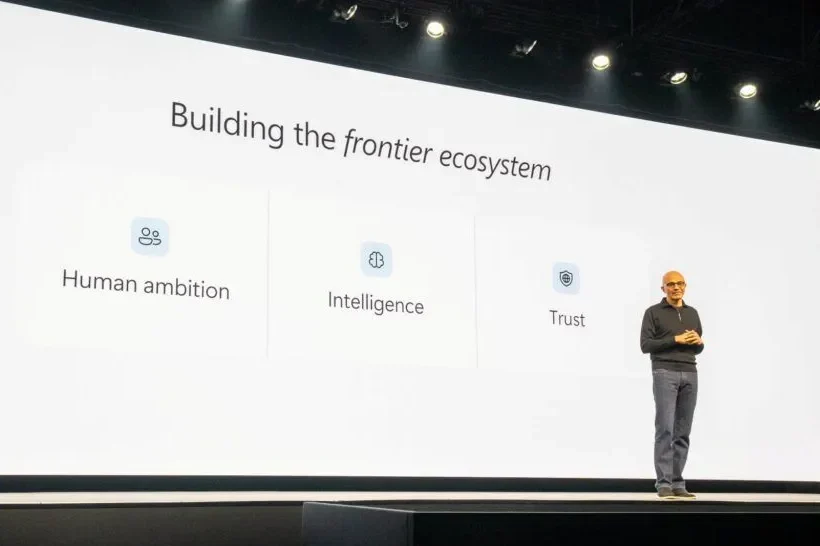
This year, Microsoft framed everything around three pillars: human ambition, intelligence and trust. Here’s what sits under each.
Human ambition: Copilot becomes where work happens
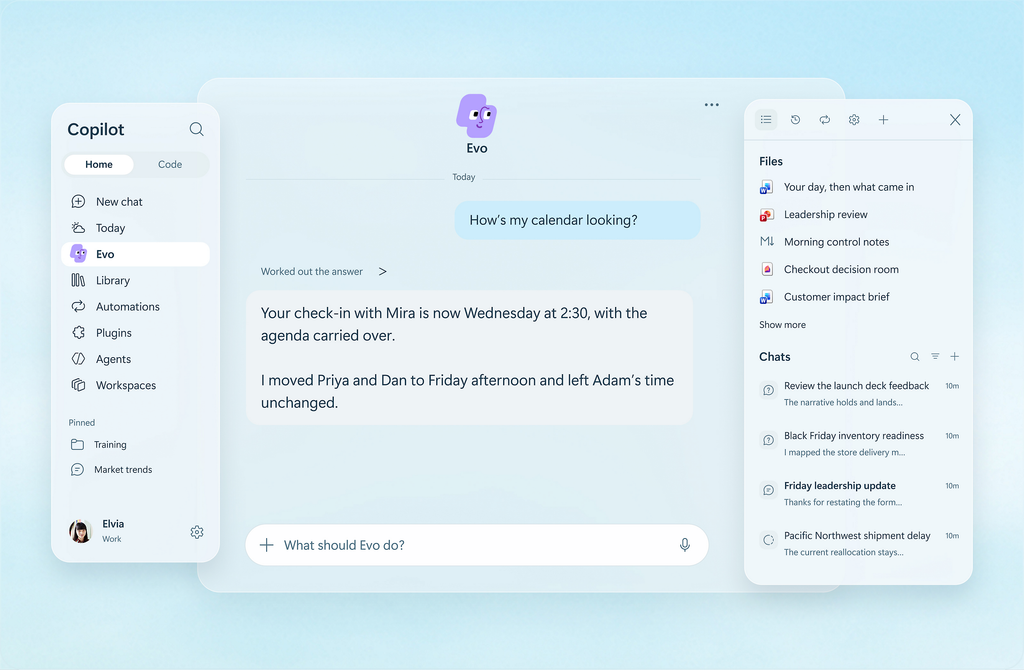
The new Microsoft Copilot app brings it all together. Copilot is the start button, the front door to your business processes. You pick the right function for the right job. Being selective means you use credits responsibly – and if you’re not sure, Auto has your back. Copilot Chat for basic tasks and queries, Cowork for more business process tasks, Copilot Code to build and Autopilot to act on your behalf and automate all of your admin.
- Home unites Chat and Cowork, so you can move from a quick question to delegating a complex, multi-step task without switching tools.
- Auto picks the right model and level of effort for each task, balancing quality, speed and cost. With new models arriving every few weeks, this matters more than it sounds.
- Copilot Code lets anyone build dashboards, trackers and simple apps in plain language, in a secure sandbox that stays within your tenant. It’s in the Frontier programme now, with general availability planned for December.
- Autopilot, previously ‘Scout’ is Microsoft’s first enterprise-grade, long-running personal agent, has its own identity and memory, follows up on threads, runs recurring work and can be @mentioned by colleagues in Teams. It’s rolling out through the Frontier programme.
- Today builds a personalised morning brief from your email, calendar, chats and meetings, and prepares drafts and next steps for you to approve (private preview).
As a partner who plays heavily in the AI Business Process space, we’re very excited about CRM and ERP are coming to Copilot. This now means the Dynamics 365 Sales and ERP apps plugins are now generally available for our customers. Your sellers can build account plans, prepare for meetings and flag deals at risk, while finance and operations teams can handle tasks like purchase requisitions and purchase orders from Cowork and Excel. And through Copilotforce, Microsoft and Salesforce are bringing Salesforce customer context and over 38 prebuilt sales skills into Copilot (public preview), with zero-copy data sharing between Salesforce Data 360 and Microsoft Fabric. The way people use business systems is shifting from forms and screens to conversation and delegation, and Copilot is positioned as the layer on top of whichever CRM or ERP you run. That’s a big productivity win, but it also means the quality of your data, security model and processes now shows up directly in the quality of your AI.
This is especially great news for organisations who use Salesforce Sales Cloud. CRM stops being a separate place that employees have to go to and becomes part of the everyday flow of work. Copilot can now combine Salesforce opportunity/account information + Outlook email + Teams meetings/conversations + SharePoint/OneDrive documents through Work IQ. This is much more powerful than CRM on its own because CRM knows what has been recorded, while Microsoft 365 contains much of what is actually happening. All of this means higher seller productivity, less CRM admin (happier sellers?) and better data quality.
Intelligence: Microsoft IQ + your business context
If every organisation can access the same frontier models, what makes your AI better than your competitor’s? Microsoft’s answer is your context.
It’s been moving in this direction for some time but Microsoft IQ is now generally available as an enterprise context-management layer, which brings together:
- Work IQ: how your people work across meetings, emails and documents, now with memory and the ability to create content and run longer tasks (generally available), plus proactive “listen” capabilities and tighter controls in preview.
- Fabric IQ: your business data, with the meaning and metrics behind it, now reaching into Copilot, Excel and other AI tools.
- Foundry IQ: your unstructured content and knowledge.
- Web IQ: fresh, real-world knowledge from the web.
Add Business Plugins, a governed way to package your expertise, skills and tools for reuse across agents, and continuous improvement in Foundry, where agents get measurably better from real production signals, and the message is clear: every agent you build should make the next one smarter.
As Judson Althoff put it: “AI is only as powerful as the data and context that grounds it.”
This is a great benefit for customers. The way your organisation sells, serves, plans and complies can now be captured and reused by AI, rather than living in people’s heads. Businesses with a well-governed data foundation will compound that advantage fastest. Work IQ understands how your teams actually work. Fabric IQ understands how your business actually operates. For example it could show you why margin has fallen in a particular region, which of your customers are affected and offer you next best actions and reporting. Foundry IQ makes sure you custom agents get trusted and relevant knowledge rather than relying on generic model knowledge. For example, a service agent can now search manuals, knowledge bases and policies before recommending a fix. Finally, Business Plugins could create know-ow that multiple agents can use. For example, you could create a ‘Customer 360’ plugin that Copilot, a sales agent and service agent could all use.
Trust: control, cost and confidence
This is the pillar we’d encourage every leadership team to review twice. After Microsoft Build 2026, we saw that the biggest barrier to scaling agents is no longer capability or adoption, it’s control. Ignite tackled that head on:
- Agent 365 Cost Management (preview) gives one view of usage-based AI spend across Cowork, Code, Copilot Studio, Autopilot and more, with spending policies, limits, alerts and chargeback reporting through Fabric.
- Agent 365 Business Analytics (Frontier programme) shows leaders what AI costs against the value it delivers, using measures such as task success rate, user satisfaction and assisted hours. Satya Nadella described it as “your ERP system for AI”.
- Agent identity and containment: Entra Agent ID now extends to local agents, Intune can flag devices running unapproved agents, and Windows adds process containers to limit what agents can reach (all in preview).
- Microsoft Perception is generally available, bringing red, blue and green team security agents to help find and fix weaknesses faster.
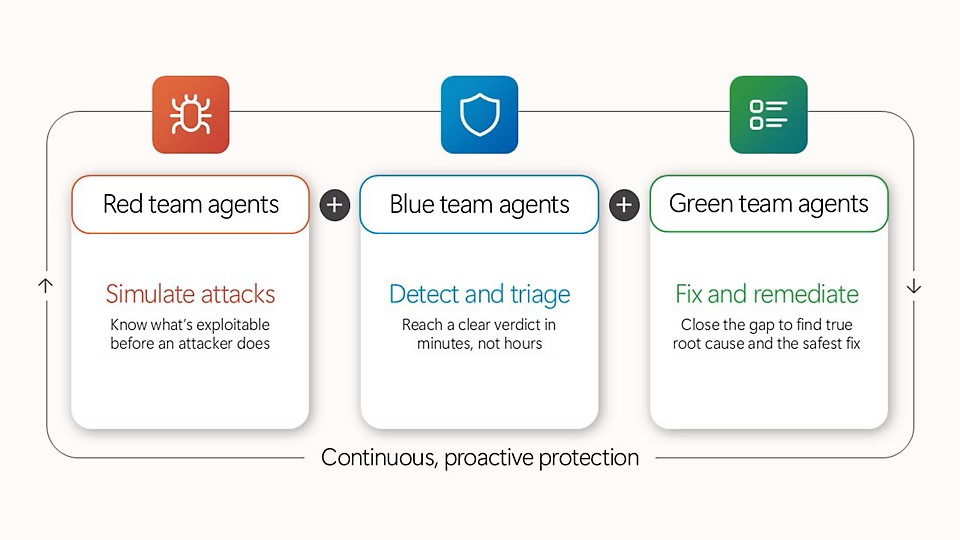
Trust should be on everyones’s agenda. There is no scaling without security and governance. AI spend is moving out of the IT budget and onto the CFO’s radar. Being able to show what each agent costs, what it delivers and who governs it turns AI from an experiment into an investment case. This is especially relevant for anyone working in regulated sectors like the public sector, financial services and healthcare, this is what unlocks scale.
Modernisation gets an agentic boost too
Dynamics 365 Activate now extends to ERP. Agents analyse existing SAP ECC environments (processes, customisations and dependencies), translate requirements, configure Dynamics 365 and move data, with project teams validating every recommendation. Its Salesforce migration experience is generally available. With SAP ECC approaching the end of mainstream maintenance, the timing is significant.
Azure Catalyst (generally available) brings AI-powered discovery, planning and modernisation across Azure and GitHub, and a new on-premises security initiative helps organisations de-risk Exchange and Sharepoint.
This is an important strategic focus for a majority of established businesses. Microsoft cites Forrester research saying 91% of IT leaders believe modernisation is necessary for AI, while respondents reported that just 43% of applications were modernised and 32% were AI-ready on average. Catalyst is now making this easier by connecting several stages that normally require separate tools and consulting exercises. Helping you to modernise your business, quicker. Hitachi Solutions can help.
What ‘Frontier’ really means for your organisation
You’ll see the word Frontier everywhere this week, and it’s worth separating two meanings.
The Frontier Programme is Microsoft’s early-access route for new capabilities such as Autopilot, Copilot Code and Agent 365 Business Analytics. Joining gives you a head start, but these features aren’t generally available yet, so plan pilots rather than production budgets.
A Frontier Firm, in Microsoft speak – is something bigger: An organisation powered by human-agent teams, where people set the direction and agents carry more of the execution. Microsoft describes three phases on the way there, and Ignite gave us the clearest toolkit yet for each:
- Human with assistant. Every employee has AI helping them work better and faster. Home, Auto, Today and the Office apps in Copilot make this the everyday norm. The goal here is adoption and habit.
- Human-agent teams. Agents join teams as digital colleagues, taking on specific tasks. Cowork, Autopilot, Copilot Workspaces and the Dynamics 365 and Salesforce plugins let people delegate real work inside the systems they already use.
- Human-led, agent-operated. People set direction while agents run whole processes, such as quote to cash or source to pay. Microsoft IQ, Copilot Studio and Copilot Managed Runtime provide the building blocks, with Agent 365 keeping cost, risk and value visible.
Most organisations we speak to sit between phases one and two, often with different teams in different phases at once. You don’t need to leap. Each phase builds the data, skills and governance the next one needs. Although what often gets overlooked is that all of this depends on AI-first leadership, skilling and a culture of high adoption. That is where your Microsoft partner comes in to establish best-practice. We’re committed to our customer-zero journey, and committed to helping you on yours.
Final Thoughts
Ignite 2026 confirmed that we’re moving from AI that assists work to AI that does the work, with people firmly in control. For your ogranisation, the opportunity is to turn the investments you’ve already made in Microsoft 365, Dynamics 365, Power Platform and Fabric into a real competitive advantage. The organisations that win won’t be the ones with the most agents, but the ones with the best context, the clearest governance and the right partners to help them scale.
Remember to:
- Check the status. Much of what was announced is in preview or the Frontier programme. Separate what’s generally available today from what’s on the roadmap before you commit.
- Plan for usage-based costs. Several new experiences, including Cowork, Code, Copilot Studio and Autopilot, are usage-based. Put guardrails in place early.
- Data readiness is the critical path. Agents are only as good as the context and permissions behind them. Clean data, sound security roles and clear ownership come first.
- Confirm regional terms. For UK and European organisations, check data residency and sovereignty commitments for each new service before you scale.
Things to do with your team today
- Take stock of adoption, data, governance and skills, and be honest about which phase each team is in.
- Pick two or three high-value processes, such as sales pipeline, source to pay or customer service, and pilot agents with clear success measures.
- Get your data foundation in order, ideally in Fabric, with permissions and sensitivity labels you trust.
- Stand up AI governance and FinOps now, before usage scales: agent identity, cost policies and value tracking.
- Invest in people as much as technology. The biggest returns come from organisations that put as much into change and adoption as into tools.
Then, ask: What’s next for your AI transformation? Whatever phase of the journey you are in, our team are here to help you figure out how much business value you are getting out of your current processes as well as your next steps.